Every plan includes IMAP, POP3 and SMTP support, along with spam and virus protection. Mailbox limits and shared storage capacity depend on the selected plan.
2 months free with annual billing
EuropeAdvanced spam filter
Business Email STARTER
Email plan for small businesses.
Monthly billing
50% off
€4.99€2.49/mo
ex VAT
Annual billing
2 months free
€29.88€24.99/yr
Monthly equivalent €2.08 · ex VAT
Up to 10 mailboxes
5 GB total shared storage. A new mailbox starts at 512 MB
Spam and virus protection
TLS secured connection
POP3, IMAP and ActiveSync
Mail archiving
Mail reporting
Admin panel
Mail forwarding
Most Popular
EuropeAdvanced spam filter
Business Email PROFESSIONAL
Email plan for small and medium businesses.
Monthly billing
42% off
€5.99€3.49/mo
ex VAT
Annual billing
2 months free
€41.88€34.99/yr
Monthly equivalent €2.92 · ex VAT
Up to 30 mailboxes
30 GB total shared storage. A new mailbox starts at 1 GB
Spam and virus protection
TLS secured connection
POP3, IMAP and ActiveSync
Mail archiving
Mail reporting
Admin panel
Mail forwarding
EuropeAdvanced spam filter
Business Email ENTERPRISE
Email plan for large businesses.
Monthly billing
36% off
€6.99€4.49/mo
ex VAT
Annual billing
2 months free
€53.88€44.99/yr
Monthly equivalent €3.75 · ex VAT
Up to 50 mailboxes
50 GB total shared storage. A new mailbox starts at 1 GB
Spam and virus protection
TLS secured connection
POP3, IMAP and ActiveSync
Mail archiving
Mail reporting
Admin panel
Mail forwarding
Each plan includes a defined number of email accounts. Upgrade your plan as your business grows.
Keep your email history organized and access previous correspondence whenever you need it.
With EuroVDC Business Email, manage mailboxes, domain settings and email security from your customer panel. Create new accounts, check DNS records, and get Outlook and mobile setup details easily. Adjust spam filters and quarantine settings to your needs.
Manage email accounts and aliases in one place. Create new accounts as needed and adjust existing accounts and connection settings.
Email security under your control
Manage spam filters, quarantine settings, and trusted or blocked sender lists. Keep unwanted email under control.
DNS settings at a glance
View the status of your MX, SPF, DKIM and DMARC records. If your domain is hosted at EuroVDC, apply the required DNS records from your hosting panel.
The tools you need for email management
The tools you need for email management
Feature
EuroVDC Business Email
Email management
Account and alias management
Access
Webmail, Outlook and mobile device support
DNS management
MX, SPF, DKIM and DMARC status checks
Spam protection
Filters, quarantine and sender lists
Security
IP and connection checks
What is in the panel
The preview is intentionally small. Click the image to see the screen clearly.
Mail accounts
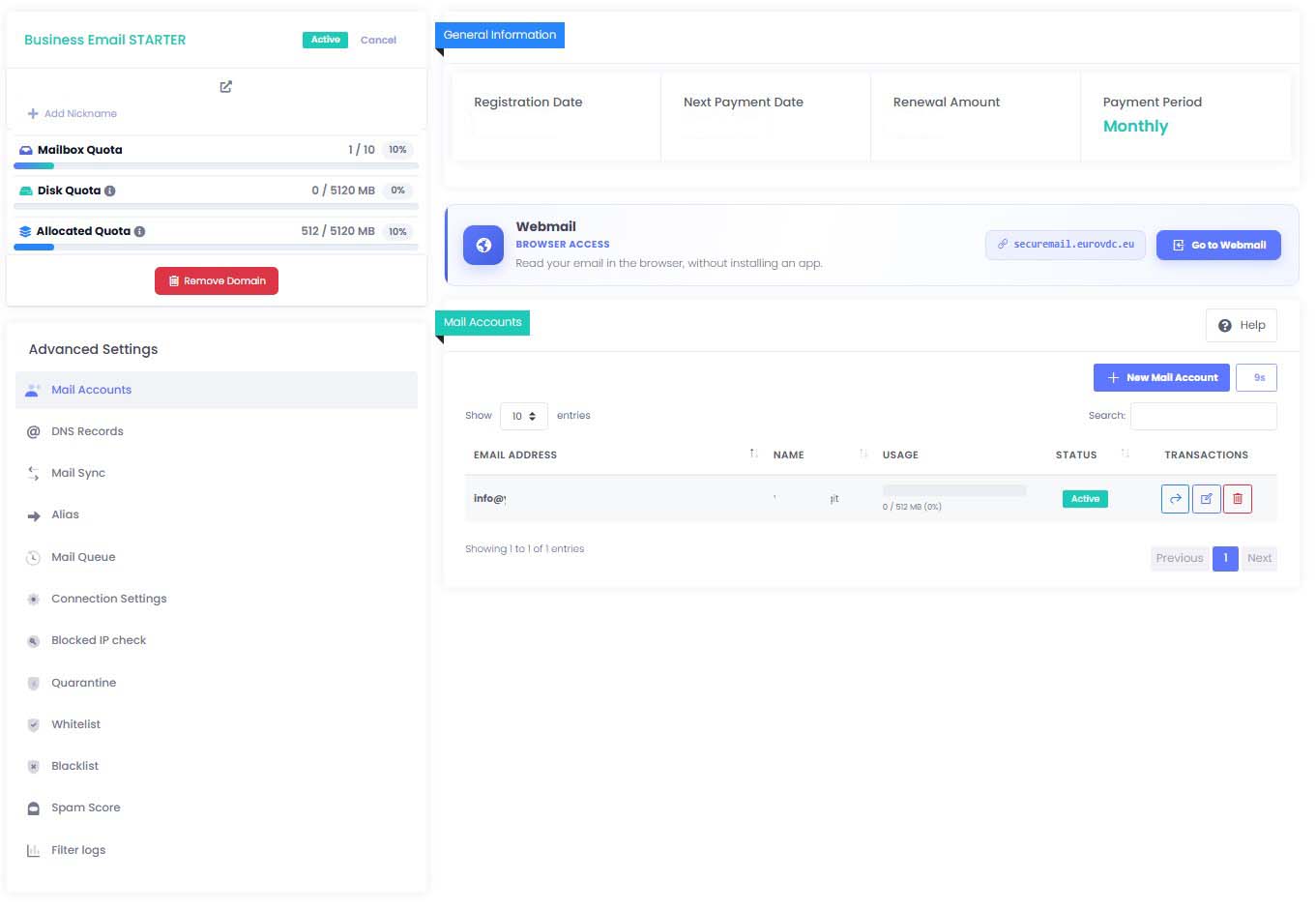
You create the team mailboxes from this screen. For each account you set the display name, the quota in megabytes, and whether the account is on or off. A forgotten password is reset from the same list. The mailbox count and the quota you have assigned sit beside the list, so you add a new person or turn an unused mailbox off without passing the plan limit.
DNS records
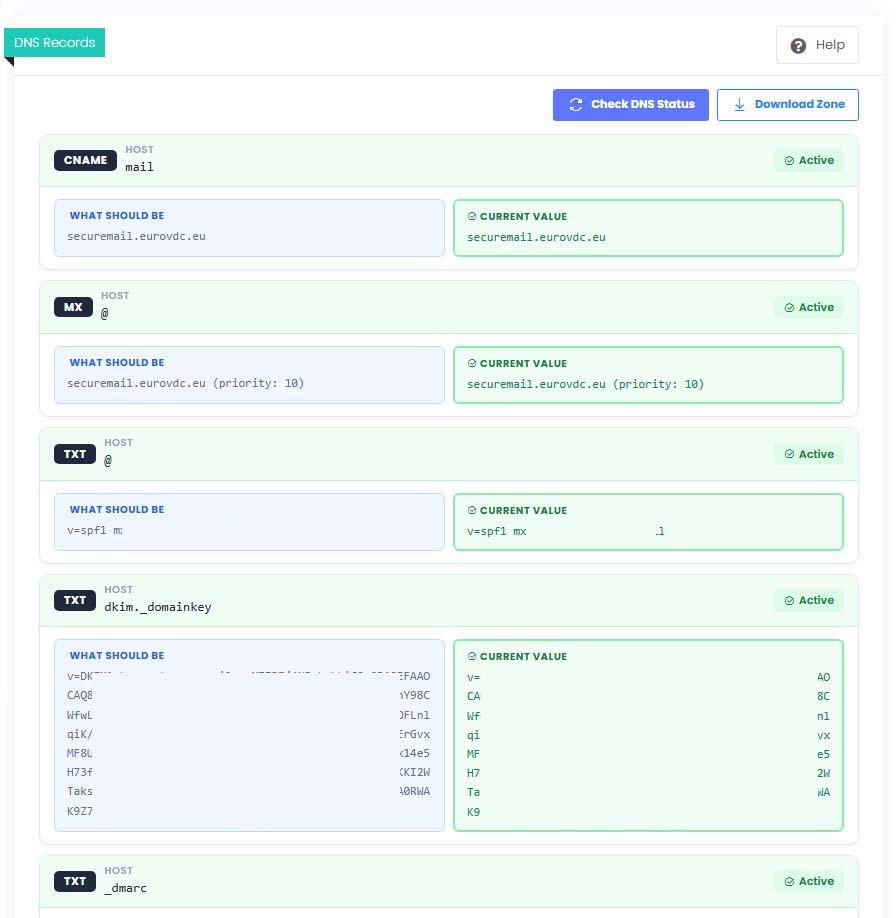
You see the status of MX, SPF, DKIM and DMARC, plus the mail, autodiscover and autoconfig names, in one list. A missing or wrong row is marked on its own. After you correct the record, you run the check again. Whether mail lands in the inbox, and whether someone else can send as you, depends on these records.
Connection settings
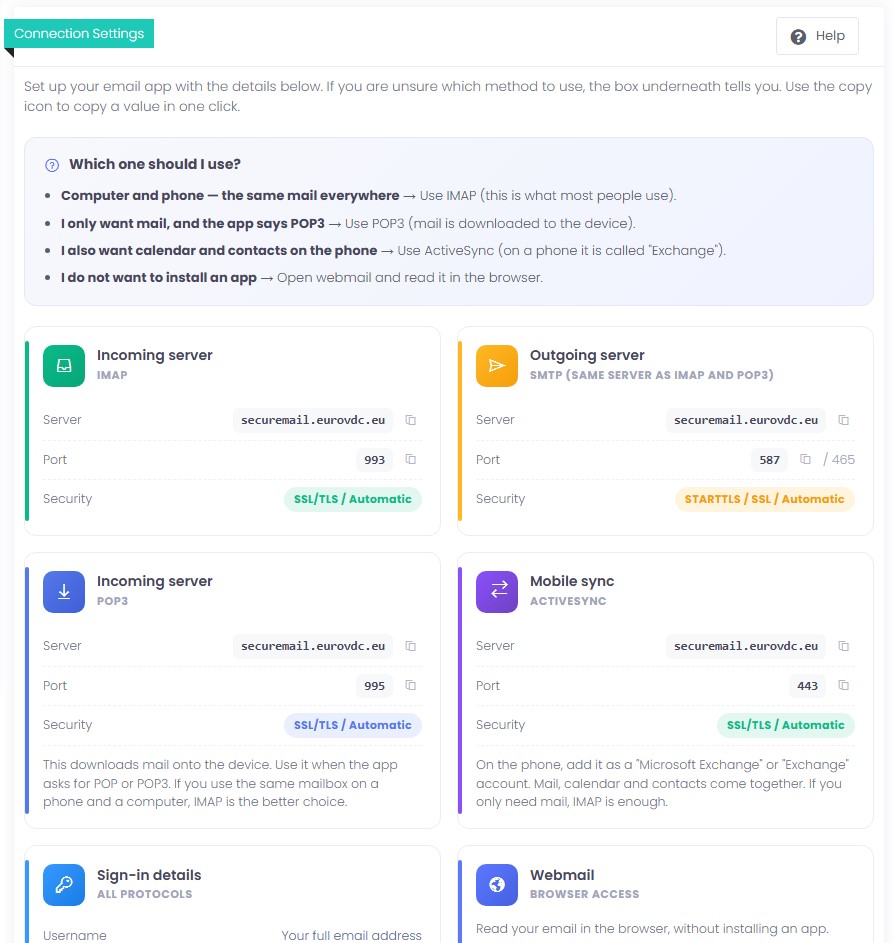
Server name, port and security type are ready for Outlook, a phone and webmail. IMAP keeps mail on every device, POP3 downloads messages to the device, and SMTP sends. ActiveSync brings mail together with calendar and contacts on a phone. You copy the values; the username is the full email address. Webmail opens at securemail.eurovdc.eu. An Apple setup profile is downloaded from this same page.
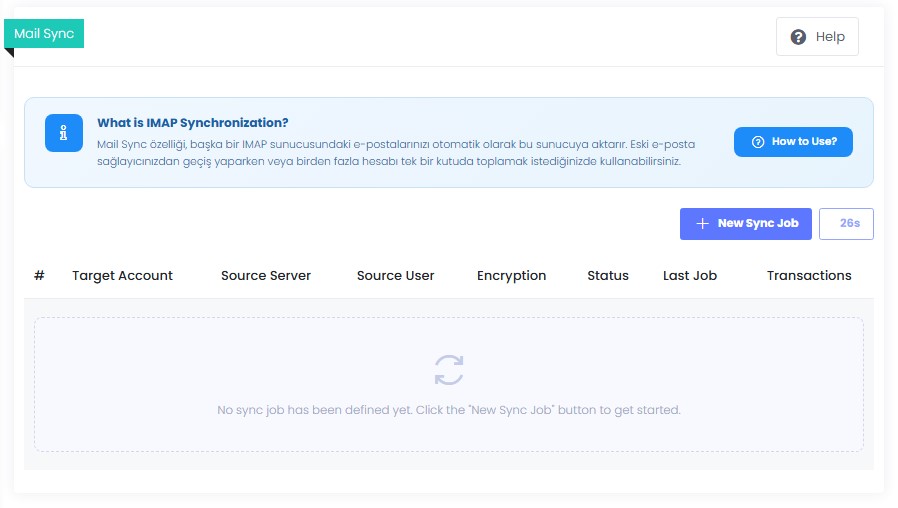
Mail sync
You move mail from the old server into the new mailbox from the panel. The destination is your mailbox at EuroVDC. For the source you enter the IMAP server name, username and password. The source account is not changed; messages are read and copied to the destination. You choose how often it checks. Copies can land in a subfolder instead of the inbox. You follow the progress in the same list.
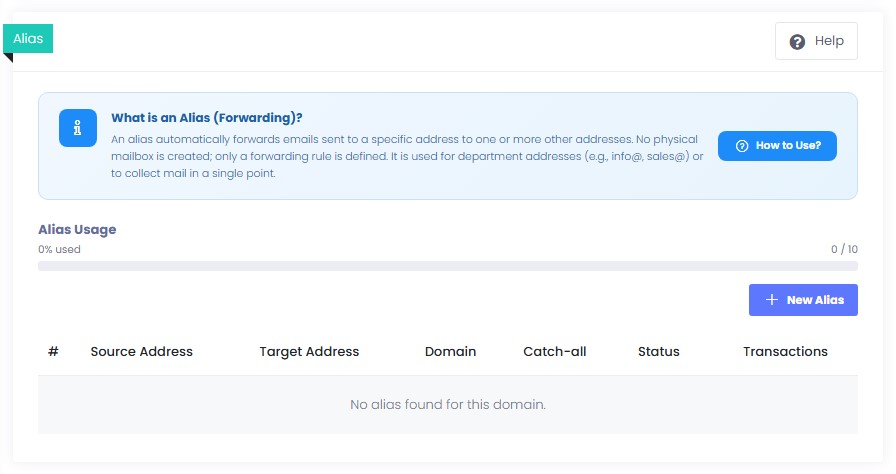
Aliases
You point addresses such as info, sales or support at one or more existing mailboxes without opening a new one. No mailbox is created; only a forwarding rule is stored. Incoming mail arrives in the accounts you choose. A catch-all can collect addresses that do not exist into one mailbox. You do not keep a separate quota and password for every role.
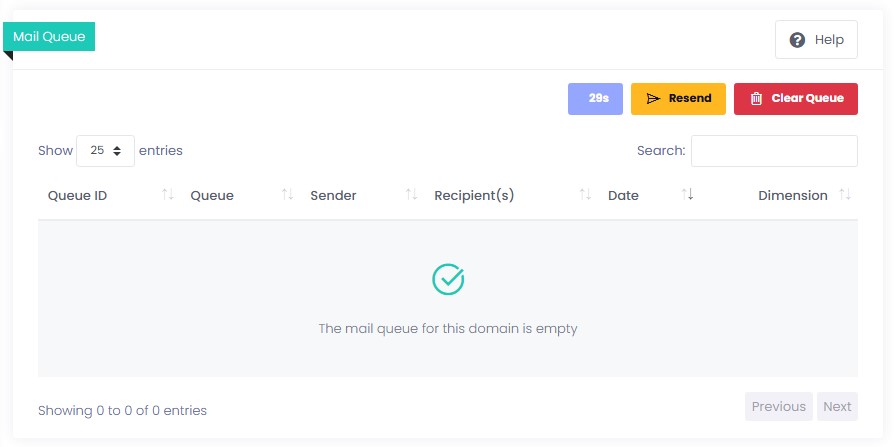
Mail queue
You see messages that have not been delivered yet, with sender, recipient, date and size. When a mail does not go out, you look at this list first. You retry delivery. You learn whether the problem is still in the queue without deleting and recreating the mailbox.
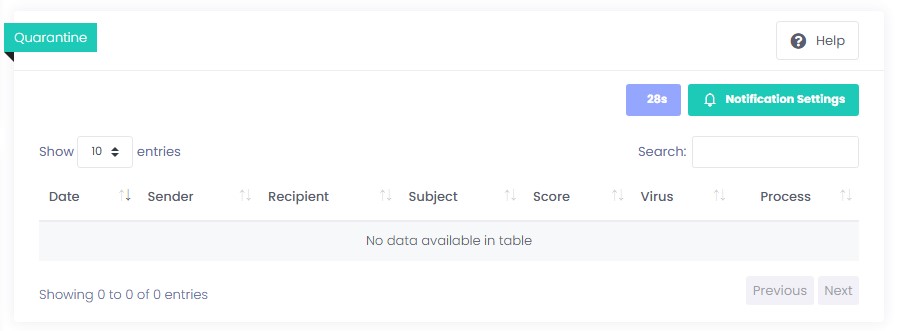
Quarantine
Messages treated as suspicious wait here instead of landing in the inbox. You see sender, subject and date, then decide whether the message is yours. Mail you trust is released to the inbox; the rest stays in quarantine. The team reaches legitimate mail without turning the filter off.
Allow list
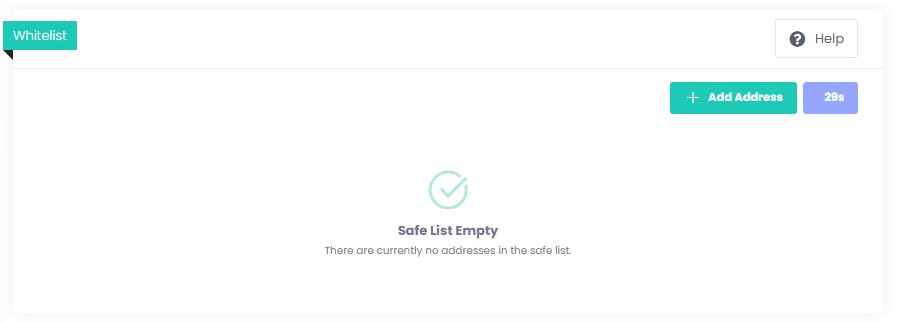
You add a customer, a bank or your own domain to the allow list. You can enter an address, a form such as *@example.com, or an IP. Mail from those senders is not held by the filter and reaches the inbox. The list applies to your domain, so you do not repeat the same rule in every mailbox.
Block list
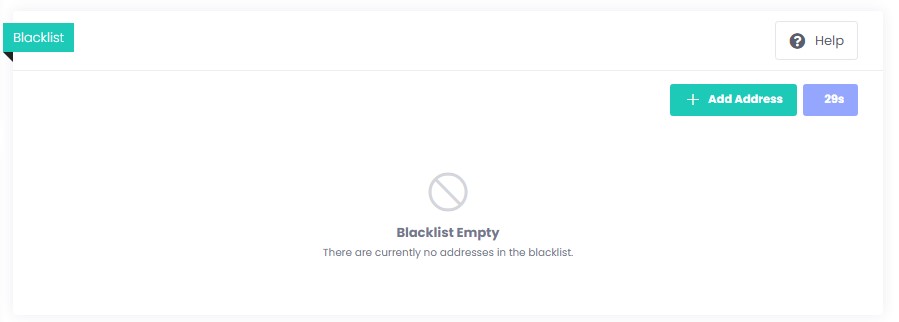
You block a sender you do not want, or a whole domain. Mail from those addresses does not reach the mailbox. You do not have to change the whole filter to stop one annoying address. You update the list whenever you need to, and you remove an address that was added by mistake.
Spam threshold
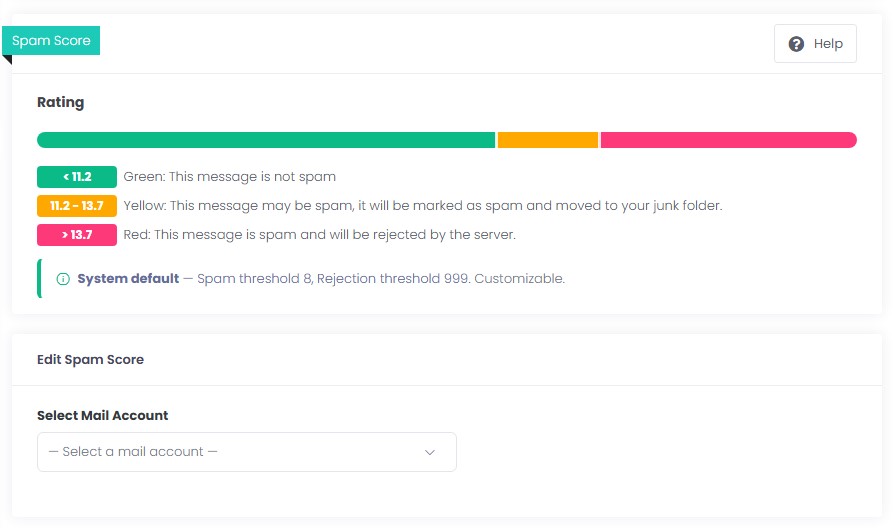
Each account has two limits. The lower one moves suspicious mail to the junk folder. The upper one refuses a message that passes the limit. Defaults are already set; you raise or tighten them for your work. The inbox stays clear, and legitimate mail is not lost.
Filter logs
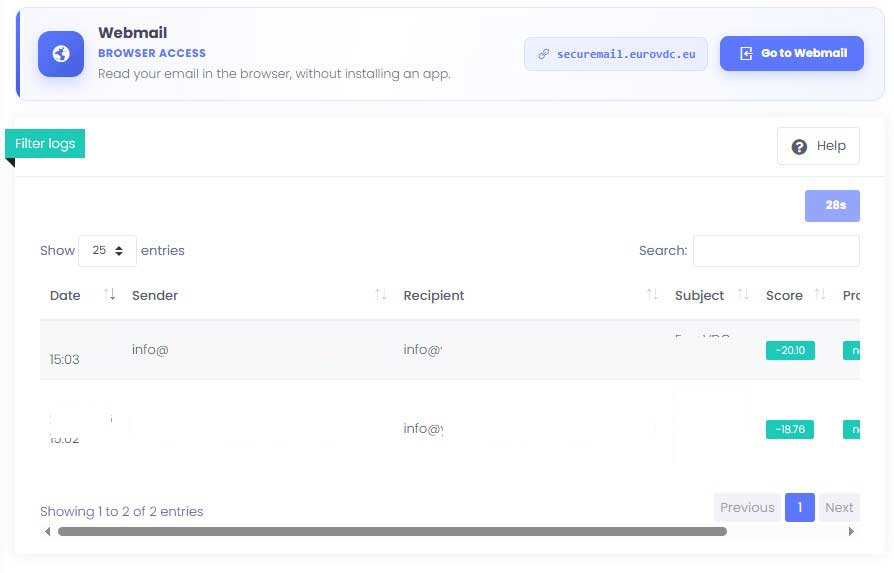
You read in the log why a message was filtered, which score it received, and what was done with it. When a customer says the mail never arrived, you look at the row instead of guessing. Subject, sender and result are on the same screen. You then adjust the threshold or the allow list.
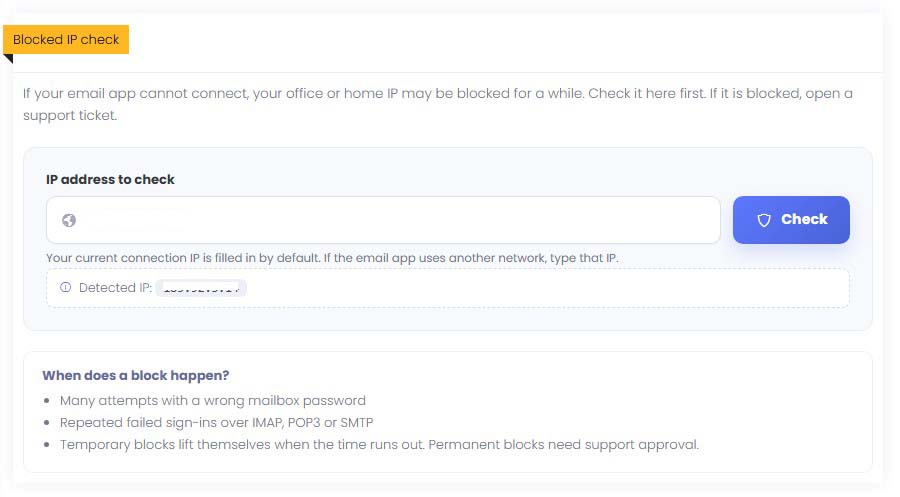
Blocked IP check
If Outlook or a phone suddenly cannot connect, you first check whether your own IP address is temporarily blocked. A block usually follows repeated wrong passwords; addresses are not closed at random. The result is shown on the screen. If there is a block, you open the support request from the same place.
MX and the related records are written in one step. If Local Mail Server stays selected, mail is accepted on the hosting server.
Domain at EuroVDC
DNS records are written from the hosting panel
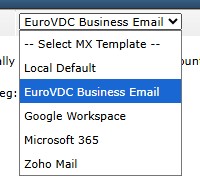
If the domain DNS is at EuroVDC, choose the EuroVDC Business Email template on the DirectAdmin screen in the hosting panel. MX, the mail, autodiscover and autoconfig names, and the DMARC record are written in one step. If Local Mail Server stays selected, incoming mail is accepted on the hosting server and never reaches the business mailbox. The template turns that option off. The DKIM key is unique to each domain, so it is not in the template. You copy the value from the DNS screen in the customer panel and add it there.
99.99% uptime target. This is an operational target, not a contractual SLA or uptime guarantee. Based on an illustrative 365-day calculation, this corresponds to approximately 53 minutes of downtime per year.
1 hour
Fast activation
Usually within 1 hour on weekdays
IMAP + SMTP
Access on every device
Outlook, mobile and webmail support
MX · SPF · DKIM
DNS control
DNS record status including DMARC
1 panel
Full control
Account, DNS and spam management
Why Choose EuroVDC Business Email?
A secure and easy-to-manage email service that gives your business professional email addresses using your own domain.
Professional Business Email
Create professional email addresses using your own domain. Communicate with customers through email addresses that reflect your business identity.
Spam and Virus Protection
Incoming emails are filtered for spam and viruses. Manage quarantine and security settings from your control panel.
Easy Email Management
Manage mailboxes, aliases and security settings from a single panel. Handle your email administration with ease.
Access Across Your Devices
Access your email through Outlook, Thunderbird and mobile devices. Use your preferred email application with IMAP, POP3 and SMTP support.
DNS and Domain Monitoring
Check the status of your MX, SPF, DKIM and DMARC records. Monitor the DNS configuration required for email delivery.
Support When You Need It
We respond to support requests during business hours and provide 24/7 support for service outages.
How to Set Up Business Email?
01
Choose a Plan
Select the right business email plan for your IMAP/SMTP needs. Activation is usually within about 1 hour on weekdays.
02
Add DNS Records
Add MX, SPF, DKIM and DMARC records to your domain’s DNS settings (panel status checks help).
03
Configure Your Client
Set up your business email address in Outlook, Gmail, or any IMAP client using the connection values from the customer panel.
Business email — frequently asked questions
How many mailboxes you can open, moving old mail, DNS records, spam, and hosting in Europe.
Do I need a website to use business email on my own domain?
No. You do not need a live website. You need a domain you control and the DNS records that make mail work. You can use you@yourcompany.com before the site is published. If another company manages the domain DNS, the records are updated there.
How many mailboxes can I open, and how is storage counted?
The mailbox count and storage are on the plan card on this page. Storage is a shared pool for the domain, not a separate disk for every address. A new mailbox opens at the plan’s starting size. You see the quota and whether the account is on from the account list in the customer panel.
Can I use it in Outlook, on a phone and in webmail?
Yes. The connection screen in the customer panel has IMAP, POP3, SMTP and ActiveSync ready. IMAP keeps mail on your devices, POP3 downloads it, SMTP sends. ActiveSync brings mail together with calendar and contacts on a phone and is usually set up there under the name Exchange. Webmail is at securemail.eurovdc.eu. Using the Gmail app does not mean Google hosts the mailbox.
Can I copy my existing mail into a EuroVDC mailbox?
Mail sync in the customer panel copies messages from the old server into your EuroVDC mailbox. You enter the source IMAP server, username and password. The source account is not changed. You choose how often it checks. Incoming mail reaches the new service only after a separate, planned MX change. A move without interruption cannot be promised before the source system and DNS are checked.
How do I reduce the chance that my mail lands in spam?
On the DNS screen in the panel, check MX, SPF, DKIM and DMARC. A missing row is marked. The DKIM key belongs to that domain and is not in the DirectAdmin template; you copy it from the DNS screen. Quarantine, the spam threshold, the allow list and the block list are in the same panel. Correct records lower the spam risk. They do not mean every message will reach the inbox. The recipient’s filter and the sender’s reputation still matter.
Where is the mail kept, and does EU hosting mean GDPR compliance?
Business email is kept in our datacenter in Europe. A European location matters if you want the mail kept in Europe. Location alone is not GDPR compliance. Who can access the mail, how long it is kept, and your company’s own duties still have to be judged separately.
Do info@, sales@ and support@ each need their own mailbox?
Open a mailbox when the address needs its own inbox, password and user. If the address only needs to arrive in one or more mailboxes you already have, an alias is enough and no mailbox is created. A catch-all can collect addresses that do not exist into one mailbox. How many aliases you can add is shown on the alias screen for your plan.
What should I check first if I cannot send or receive mail?
First sign in to webmail at securemail.eurovdc.eu. If webmail opens and Outlook or the phone does not, the client settings are the likely cause. If nothing opens, check DNS status, whether the quota is full, and the blocked-IP check in the panel. A block usually follows repeated wrong passwords. When you write to support, send the error text, the time and the app you used. Do not send the password.
How are DNS records written if the domain DNS is at EuroVDC?
In DirectAdmin, in the hosting panel, choose the EuroVDC Business Email template. MX, the mail, autodiscover and autoconfig names, and DMARC are written in one step. The template turns off the local mail server. If that option stays on, incoming mail is accepted on the hosting server and never reaches the business mailbox. DKIM is not in the template; you add it from the DNS screen in the customer panel. If the DNS is not at EuroVDC, you apply the same records where the DNS is. You still check the status from the customer panel.
After I buy it, where do I manage the email?
After you buy, you manage the service in the customer panel. You open mailboxes, see the quota, look at the queue, set quarantine and the spam threshold, and read the filter log. Webmail is only for reading mail. securemail.eurovdc.eu is not the management screen.
Switch to corporate email
Open mailboxes on your domain. Copy old mail from the panel. Incoming mail moves only after a separate MX change.
IMAP copy in the panel • MX change is separate • Support: support@eurovdc.eu
Fees are non-refundable on all products. Cancellation terms are in the service agreement.
This web page uses cookies.
Cookie Preferences
We use cookies to run the site and, with your consent, for analytics. See our Cookie Policy for details. You can change preferences anytime. Cookie Policy
Essential Cookies
Required for the website to function. Cannot be disabled.
Always Active
Analytics Cookies
Collects anonymous data about visitor numbers and behavior to help us improve the website.
Marketing Cookies
Used to display personalized ads and measure the effectiveness of campaigns.
Functional Cookies
Used to remember your preferences such as language and region.